
Linux常用命令
介绍
Linux常用命令
命令
重启: reboot
编辑器(vi,vim)强制退出:q!
SSH连接服务器:ssh -P 端口号用户名@服务器IP -i 秘钥绝对路径-P 6789-P 端口号web@59.110.5.244web:用户名@59.110.5.244@IP
-i ~/Desktop/id_rsa-i 秘钥地址
上传文件
scp -P 端口号 -i 秘钥绝对路径 上传文件的绝对路径 用户名@服务器ip:上传文件要保存的位置
基本部署操作
1.root用户登陆运行以下第一句指令,其他根据提示进行输入:
ssh-keygen -t rsa
Generating public/private rsa key pair.
Enter file in which to save the key (/root/.ssh/id_rsa):                 #建议直接回车使用默认路径
Created directory '/root/.ssh'
Enter passphrase (empty for no passphrase):            #输入密码短语(留空则直接回车)
Enter same passphrase again:                                  #重复密码短语
Your identification has been saved in /root/.ssh/id_rsa.
Your public key has been saved in /root/.ssh/id_rsa.pub.
The key fingerprint is:
05:71:53:92:96:ba:53:20:55:15:7e:5d:59:85:32:e4 root@test
The key's randomart image is:
+--[ RSA 2048]----+
|   o o ..                |
| . o oo.+ .            |
| o.+... =               |
| ...o                     |
| o S                     |
| .                         |
|                           |
|                           |
|                           |
+--------------------+
此时在/root/.ssh/目录下生成了2个文件,id_rsa为私钥,id_rsa.pub为公钥。私钥自己下载到本地电脑妥善保存(丢了服务器可就没法再登陆了),为安全,建议删除服务器端的私钥。公钥则可以任意公开。
2.使用以下命令将公钥导入到VPS:
cat /root/.ssh/id_rsa.pub >> /root/.ssh/authorized_keys
3.修改SSH的配置文件/etc/ssh/sshd_config :
#RSAAuthentication yes
#PubkeyAuthentication yes
#AuthorizedKeysFile .ssh/authorized_keys
去掉上面3行前面的#,保存后重启SSH服务。
service sshd restart
至此你的linux服务器已经支持使用SSH私钥证书登录。在你使用SSH Key登录验证成功后,还是为了安全,建议你关闭root用户使用密码登陆,关闭的方法如下:
修改SSH的配置文件/etc/ssh/sshd_config,找到下面1行:
PasswordAuthentication yes
修改为
PasswordAuthentication no
保存后重启SSH服务。
service sshd restart
WARNING
Linux CentOS 7 下重启服务不再通过 service 操作,而是通过 systemctl 操作
查看 sshd 服务是否启动:
systemctl status sshd.service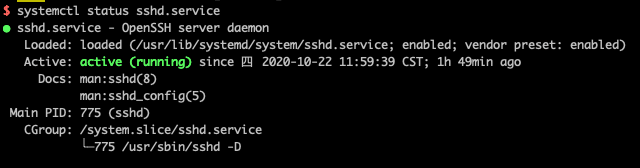
看到上述信息就可以确定是启动了。
如果没有启动,则需要启动该服务:
systemctl start sshd.service重启 sshd 服务:
systemctl restart sshd.service设置服务开启自启:
systemctl enable sshd.service